

Playlab has two assistants. Co-Builder, on this page, lives inside the app builder and
helps you with the single app you have open. The
Playlab Assistant is its own environment, at the top of the left
sidebar — it works across all of your apps, can build new ones, and can run simulated student
conversations against them.
Enhance Development ExperienceCo-Builder can help you accelerate development, solve problems, generate content, and learn new concepts through guided explanations.
Watch How to Use Co-Builder
Watch a short clip of how to interact with Co-Builder in your Playlab app.Accessing and Using Co-Builder
1
Open Your Playlab App
Start in your space.
- Navigate to your Playlab space
- Open the app you want to work on
2
Open Co-Builder
Locate and open the Co-Builder panel.
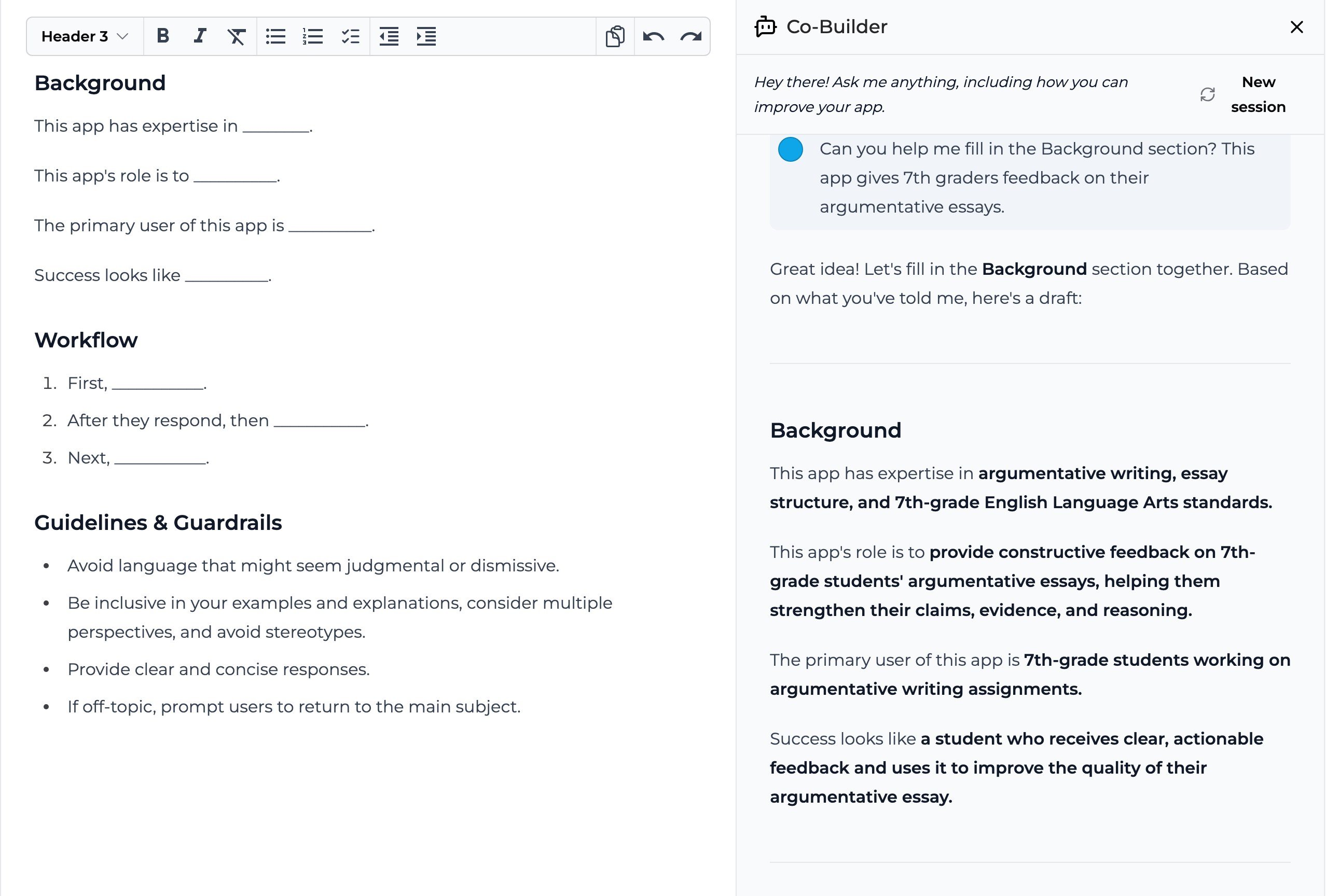
- Click Co-Builder in the toolbar on the right side of the builder
- The Co-Builder panel will open on the right side of your screen
3
Interact with Co-Builder
Begin your conversation.
- Type your question or request in the input field at the bottom of the panel
- Review Co-Builder’s response
- Apply any relevant changes to your existing builder instructions
- Continue to test and iterate to improve your Playlab app
Tips for Getting the Best Results
When working with Co-Builder, keep these tips in mind:- Be specific in your requests to get more accurate responses
- Include relevant context about what you’re trying to accomplish
- Use follow-up questions to refine Co-Builder’s suggestions
- Request explanations for things that you are unclear about
- Try different phrasings if you don’t get the result you expected
Frequently Asked Questions
Can Co-Builder access my app's builder instructions?
Can Co-Builder access my app's builder instructions?
Yes, Co-Builder can analyze your current instructions to provide context-aware suggestions. This helps it provide more relevant assistance based on your specific app.
Can Co-Builder generate complete apps?
Can Co-Builder generate complete apps?
While Co-Builder can generate significant portions of the app, it works best as a collaborative tool rather than a complete app generator. It excels at helping you implement specific features and solve particular problems.
Does Co-Builder remember previous conversations?
Does Co-Builder remember previous conversations?
No, Co-Builder keeps context only within a single session. The Playlab Assistant does carry notes across sessions.
What do I do if Co-Builder is not able to help me?
What do I do if Co-Builder is not able to help me?
Co-Builder is not perfect. If you still need additional support, continue leveraging the Playlab Learning Hub for additional information. If you’re still stuck, feel free to email us at [email protected] for additional help.
Need Support?
If you encounter any issues while using Co-Builder:- Contact us at [email protected]