What is this feature?
The Organization Reference Library is a central collection of references for your whole organization. Upload a knowledge file, curriculum, framework, or other material once, and any app in the organization can use it, with no need to re-upload the same reference for each app.
Coming from the previous version? Previously, shared reference libraries were scoped to a single space. Now, the shared library is organization-level. When your org migrates, your existing space reference libraries become your organization’s reference library, available to apps across all of your spaces.On the new Playlab, apps no longer show a space-level reference library. Shared references are at the organization level instead.
Rationale for the feature
Organizations often have essential knowledge bases, curricular files, and frameworks that need to be accessible across multiple teams and projects. The Organization Reference Library removes the need for individual re-uploads: one copy in the library can be added to every app that needs it.
Watch How to Use the Organization Reference Library
How to use the Organization Reference Library
Open your Playlab Builder
Log into your Playlab account and open any app in the builder.
Click the References icon on the right sidebar
Click 'Add reference to app', then select 'Browse libraries' to access your organization's reference library
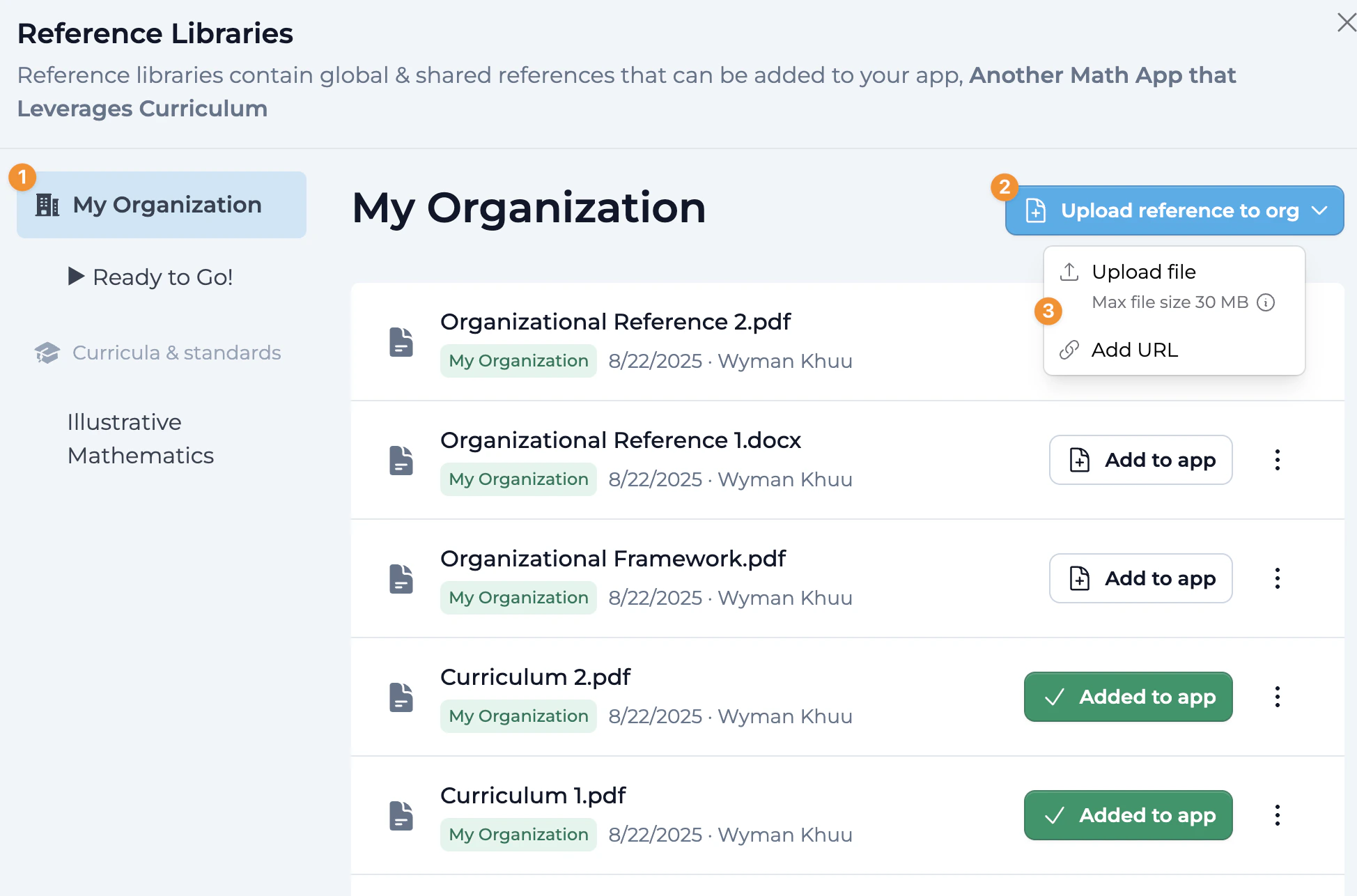
Upload references to your organization library
Click Upload reference to org, then Upload file or Add URL, to add references to your organization’s central reference library. Files can be up to 30 MB. A new file shows as processing for a moment before it can be added to an app. Only Owners, Builders, and Editors can upload; Viewers can add existing references to their apps. Add references to your app with one click
Click Add to app to attach relevant organization references to your specific Playlab app.
- Once added, the button turns green and reads Added to app.
- You can remove a reference from an app at any time, giving you full control over which references are active.
Continue building your app
The organization references now appear in your app’s References pane, for everyone who can edit the app.
Best Practices
Add references that are useful across many apps in your organization — shared curricula, frameworks, and knowledge bases.
Library references can’t be edited in place. When one changes, upload the new version, add it to the apps that need it, then delete the old one.
Use descriptive filenames that clearly indicate the content and purpose of each reference.
Be selective about which references you attach to any single app; attach only what that app needs to stay focused and performant.
Decide who should add or remove organization references, and give those people the Owner, Builder, or Editor role.
Review references regularly to ensure they contain current information.
FAQ
Is there still a space-level reference library?
No. Apps on the new Playlab don’t show a space-level reference library. The shared reference library is organization-level. When your org migrates, the references in your space libraries move to your organization’s library, available across all spaces.
Who can access the organization reference library?
Members with the Owner, Builder, Editor, or Viewer organization role can open the library from an app they can edit and add its references to that app. Members with the Space-only role can’t open it.
Can I control who can add or modify references?
Only through organization roles. The library has no settings of its own. Owners, Builders, and Editors can upload and delete library references, while Viewers can only add existing ones to their apps. To change who can manage the library, change members’ roles.
What types of materials work best in the library?
Material that many apps in your organization share, like curricula, frameworks, and standards. You can upload .pdf, .docx, .pptx, .xlsx, or .txt files, or add a URL.
How do organization references impact app performance?
Once added to an app, a library reference works like any other reference in that app, and it counts toward the app’s limit of 100 references. Add only the ones each app needs.
What happens when I update a reference?
You can’t edit or replace a library reference in place. To switch to a new version, upload it with Upload reference to org, click Add to app on it in each app that needs it, then delete the old one.
What happens when I remove a reference from the library?
You’ll see a confirmation showing how many apps currently use that reference. If you confirm, the reference is removed from those apps and no longer appears in the library for anyone in the organization.
Can I combine library references with references I add to a single app?
Yes. You can mix organization references (available org-wide) with references you upload directly to one app, giving you flexibility in how you structure an app’s materials.
What happens if I leave the organization?
You lose access to the organization’s references. Any apps you built that used those references will need alternative references added if you want to keep using them outside the organization.
Are there size limits for references?
Yes. Each uploaded file can be up to 30 MB, and an app can have up to 100 references. Playlab doesn’t limit how many references the library itself holds.
We Want Your Feedback!
Have you used the Organization Reference Library? We’d love to hear how it’s helping your organization stay consistent across projects.Contact us at [email protected]
Last updated: 10-02-2026