> ## Documentation Index
> Fetch the complete documentation index at: https://learn.playlab.ai/llms.txt
> Use this file to discover all available pages before exploring further.
# Finding your apps
> If some of your apps haven't appeared in the new Playlab view yet, here's how to find them.
**All of your apps are safe.** If some of them aren't showing in the new view
yet, you can still get to every one of them through **Switch to old view** —
and they'll be migrated into the new view over the summer.
Playlab's new view rolls out ahead of every app being moved into it. During that
window, your dashboard in the new view may not list everything yet. Nothing is
lost — the apps live in the old view until they're migrated, and you can reach
them anytime.
## Find your apps in the old view
Click your **profile button** (your initials, top-right of the screen).
Near the bottom of the menu, select **Switch to old view**.
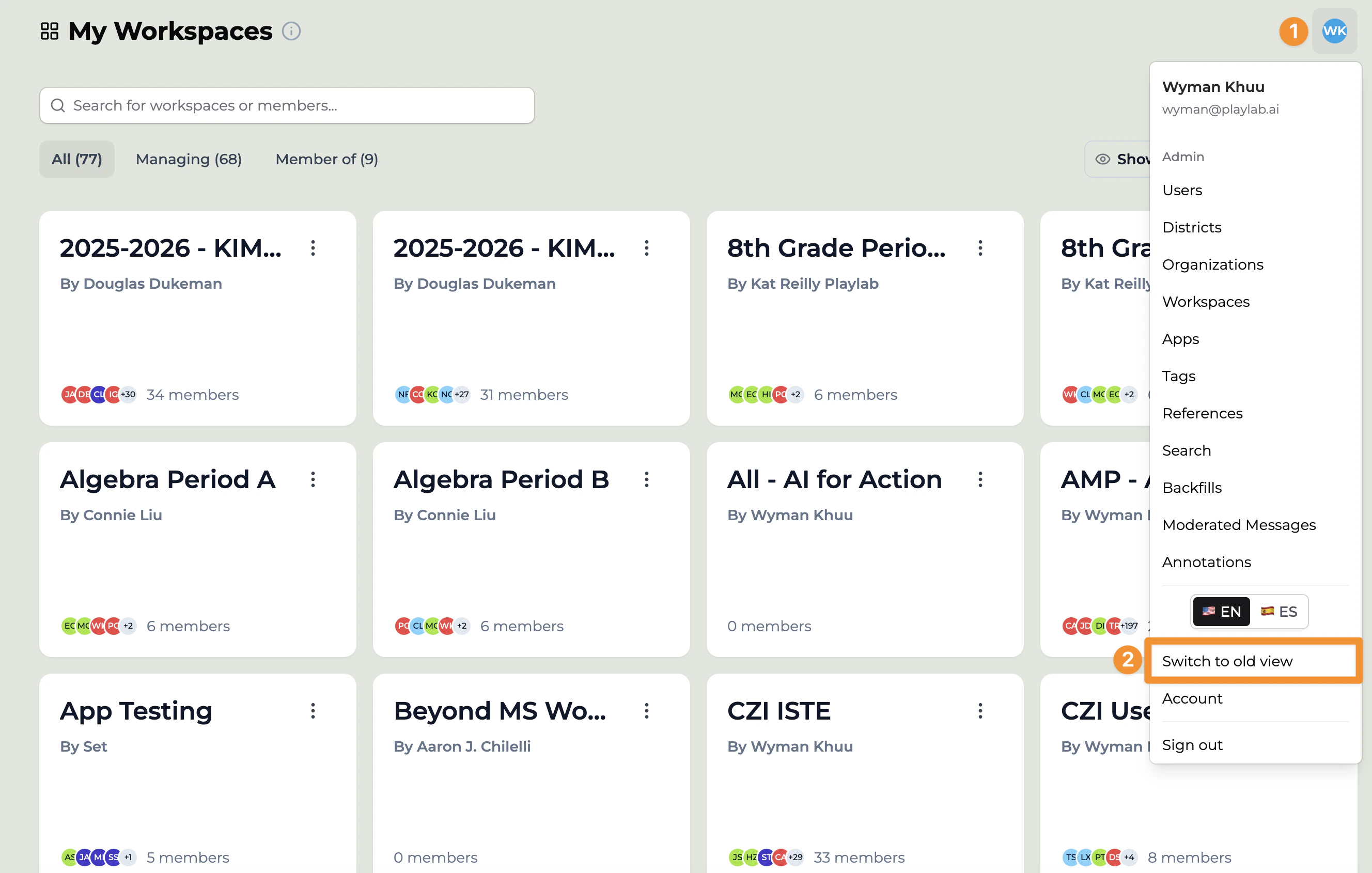 The old view shows your full list of workspaces and apps. Open or keep
building in any of them as usual.
## What happens next
* **Your apps are all there.** Anything you built or were a member of carries
forward — prompts, references, starter inputs, members, and activity history.
* **Migration is automatic.** Apps are moved into the new view over the summer;
you don't need to re-create or move anything yourself.
* **Switch back anytime.** Use the profile menu to move between the new view and
the old view while migration is in progress.
For the bigger picture on what's changing, see the
[migration guide](/whatsnew/Migration%20Guide) and the
[workflow cheat sheet](/whatsnew/Workflow%20Cheat%20Sheet).
## Still missing something?
If an app you expect is in neither the new view nor the old view, email
[support@playlab.ai](mailto:support@playlab.ai) and we'll help you locate it.
***
Last updated: 06-04-2026
Contact us at [support@playlab.ai](mailto:support@playlab.ai)
The old view shows your full list of workspaces and apps. Open or keep
building in any of them as usual.
## What happens next
* **Your apps are all there.** Anything you built or were a member of carries
forward — prompts, references, starter inputs, members, and activity history.
* **Migration is automatic.** Apps are moved into the new view over the summer;
you don't need to re-create or move anything yourself.
* **Switch back anytime.** Use the profile menu to move between the new view and
the old view while migration is in progress.
For the bigger picture on what's changing, see the
[migration guide](/whatsnew/Migration%20Guide) and the
[workflow cheat sheet](/whatsnew/Workflow%20Cheat%20Sheet).
## Still missing something?
If an app you expect is in neither the new view nor the old view, email
[support@playlab.ai](mailto:support@playlab.ai) and we'll help you locate it.
***
Last updated: 06-04-2026
Contact us at [support@playlab.ai](mailto:support@playlab.ai)