> ## Documentation Index
> Fetch the complete documentation index at: https://learn.playlab.ai/llms.txt
> Use this file to discover all available pages before exploring further.
# Co-Builder
> The assistant panel inside the app builder, formerly the Builder Assistant. Ask questions about the app you have open and get context-aware suggestions for its instructions.
Playlab has two assistants. **Co-Builder**, on this page, lives inside the app builder and
helps you with the single app you have open. The
[**Playlab Assistant**](/features/Playlab%20Assistant) is its own environment, at the top of the left
sidebar — it works across all of your apps, can build new ones, and can run simulated student
conversations against them.
Co-Builder helps you build and improve the app you have open. Whether you need help drafting instructions, troubleshooting behavior, or generating content, it works alongside you in the builder.
**Enhance Development Experience**
Co-Builder can help you accelerate development, solve problems, generate content, and learn new concepts through guided explanations.
## Watch How to Use Co-Builder
Watch a short clip of how to interact with Co-Builder in your Playlab app.
Using Co-Builder (recorded before the rename, so it still shows the old Assistant label)
## Accessing and Using Co-Builder
**Start in your space.**
1. Navigate to your Playlab space
2. Open the app you want to work on
**Locate and open the Co-Builder panel.**
1. Click **Co-Builder** in the toolbar on the right side of the builder
 2. The Co-Builder panel will open on the right side of your screen
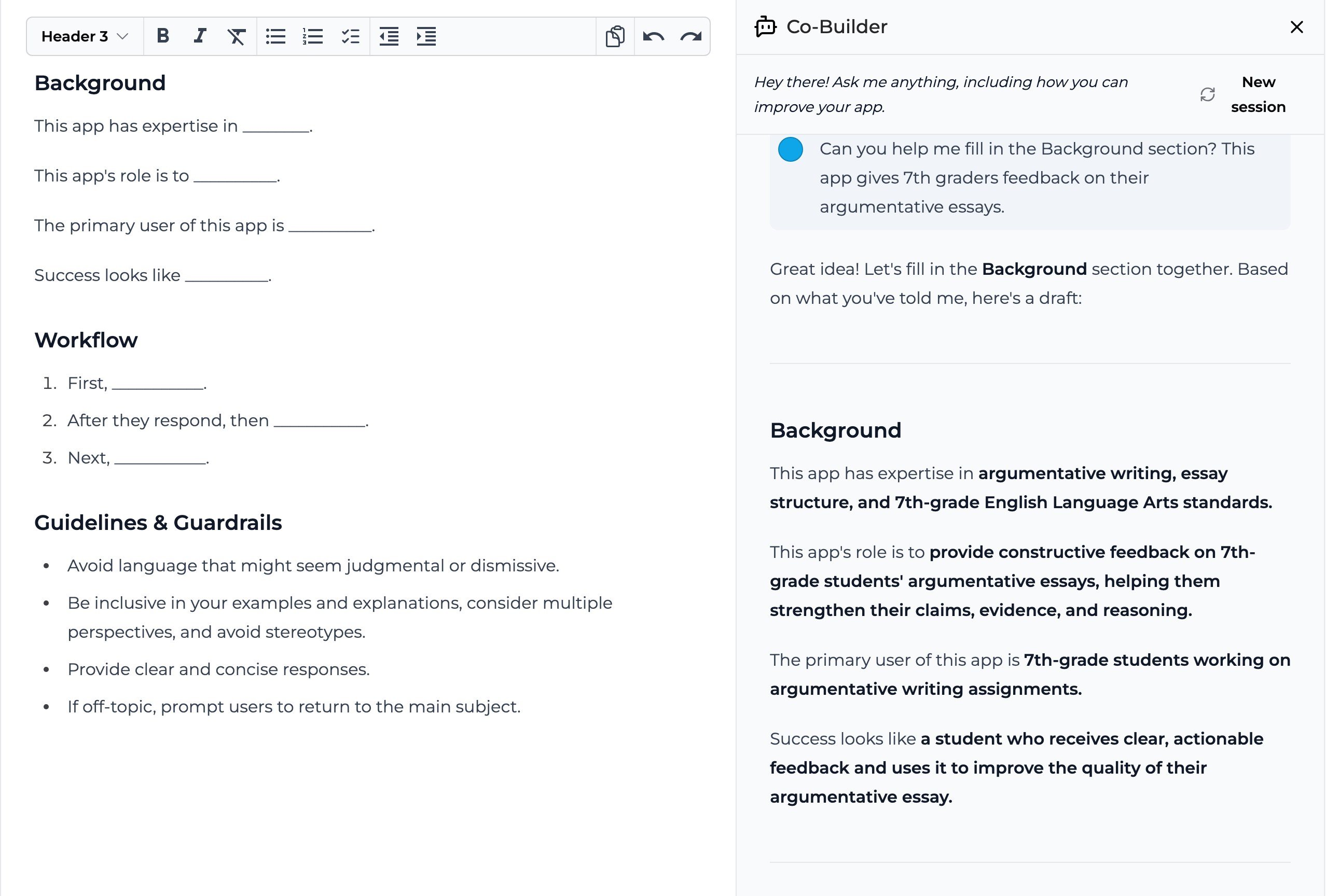 **Begin your conversation.**
1. Type your question or request in the input field at the bottom of the panel
2. Review Co-Builder's response
3. Apply any relevant changes to your existing builder instructions
4. Continue to test and iterate to improve your Playlab app
## Tips for Getting the Best Results
When working with Co-Builder, keep these tips in mind:
* **Be specific in your requests** to get more accurate responses
* **Include relevant context** about what you're trying to accomplish
* **Use follow-up questions** to refine Co-Builder's suggestions
* **Request explanations** for things that you are unclear about
* **Try different phrasings** if you don't get the result you expected
## Frequently Asked Questions
Yes, Co-Builder can analyze your current instructions to provide context-aware suggestions. This helps it provide more relevant assistance based on your specific app.
While Co-Builder can generate significant portions of the app, it works best as a collaborative tool rather than a complete app generator. It excels at helping you implement specific features and solve particular problems.
No, Co-Builder keeps context only within a single session. The [Playlab Assistant](/features/Playlab%20Assistant) does carry notes across sessions.
Co-Builder is not perfect. If you still need additional support, continue leveraging the Playlab Learning Hub for additional information. If you're still stuck, feel free to email us at [support@playlab.ai](mailto:support@playlab.ai) for additional help.
## Need Support?
If you encounter any issues while using Co-Builder:
* Contact us at [support@playlab.ai](mailto:support@playlab.ai)
Last updated: 10-05-2026
This documentation is built and hosted on [Mintlify](https://mintlify.com), a developer documentation platform.
**Begin your conversation.**
1. Type your question or request in the input field at the bottom of the panel
2. Review Co-Builder's response
3. Apply any relevant changes to your existing builder instructions
4. Continue to test and iterate to improve your Playlab app
## Tips for Getting the Best Results
When working with Co-Builder, keep these tips in mind:
* **Be specific in your requests** to get more accurate responses
* **Include relevant context** about what you're trying to accomplish
* **Use follow-up questions** to refine Co-Builder's suggestions
* **Request explanations** for things that you are unclear about
* **Try different phrasings** if you don't get the result you expected
## Frequently Asked Questions
Yes, Co-Builder can analyze your current instructions to provide context-aware suggestions. This helps it provide more relevant assistance based on your specific app.
While Co-Builder can generate significant portions of the app, it works best as a collaborative tool rather than a complete app generator. It excels at helping you implement specific features and solve particular problems.
No, Co-Builder keeps context only within a single session. The [Playlab Assistant](/features/Playlab%20Assistant) does carry notes across sessions.
Co-Builder is not perfect. If you still need additional support, continue leveraging the Playlab Learning Hub for additional information. If you're still stuck, feel free to email us at [support@playlab.ai](mailto:support@playlab.ai) for additional help.
## Need Support?
If you encounter any issues while using Co-Builder:
* Contact us at [support@playlab.ai](mailto:support@playlab.ai)
Last updated: 10-05-2026
This documentation is built and hosted on [Mintlify](https://mintlify.com), a developer documentation platform.