
> ## Documentation Index
> Fetch the complete documentation index at: https://learn.playlab.ai/llms.txt
> Use this file to discover all available pages before exploring further.

# Pinned References

> Pin critical reference files to your Playlab apps to improve app behavior and accuracy

## What is this feature?

Pinned References let you pin reference files in the builder so that your Playlab app always loads the entire file(s) into the app. The app treats these pinned references as if you copied them directly into the prompt so that they are used every time in your user interactions.

This feature is best for reference files you want your app to retrieve 100% of the time.

<Warning>
  There is a limit on the size of the combined pinned references. This is because models have limits on the amount of text they can process at once.
</Warning>

## Rationale for the feature

By loading reference files as Pinned References, we can get closer to eliminating retrieval errors, increase speed of retrieval, and improve consistency in the application of rules across all interactions. This approach complements unpinned resources by providing certainty for your most essential reference materials while maintaining the flexibility of on-demand retrieval for larger knowledge bases, giving you the best of both worlds in one simple workflow.

## How do I use Pinned References?

<Steps>
  <Step title="Upload your reference file">
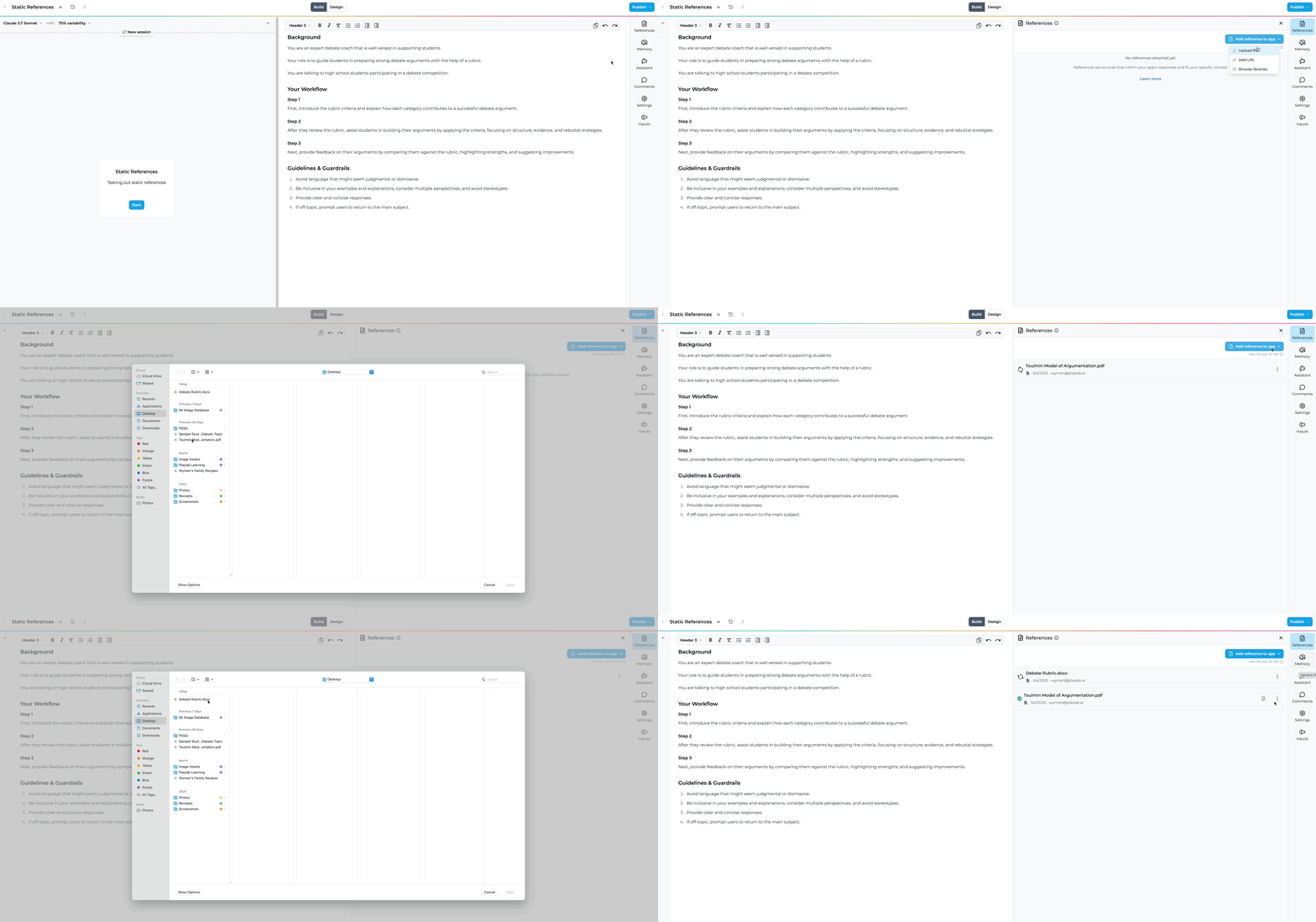
    First, upload the reference document(s) you want to use in your app.

    <img height="400" src="https://mintcdn.com/playlabai/B6SPJ1dvTCXE2aSF/images/uploadingreferences.gif?s=5a5a838947d406ac9c59536b1b34d804" className="border border-gray-300 rounded-md shadow-sm" data-path="images/uploadingreferences.gif" />
  </Step>

  <Step title="Mark as Pinned Reference">
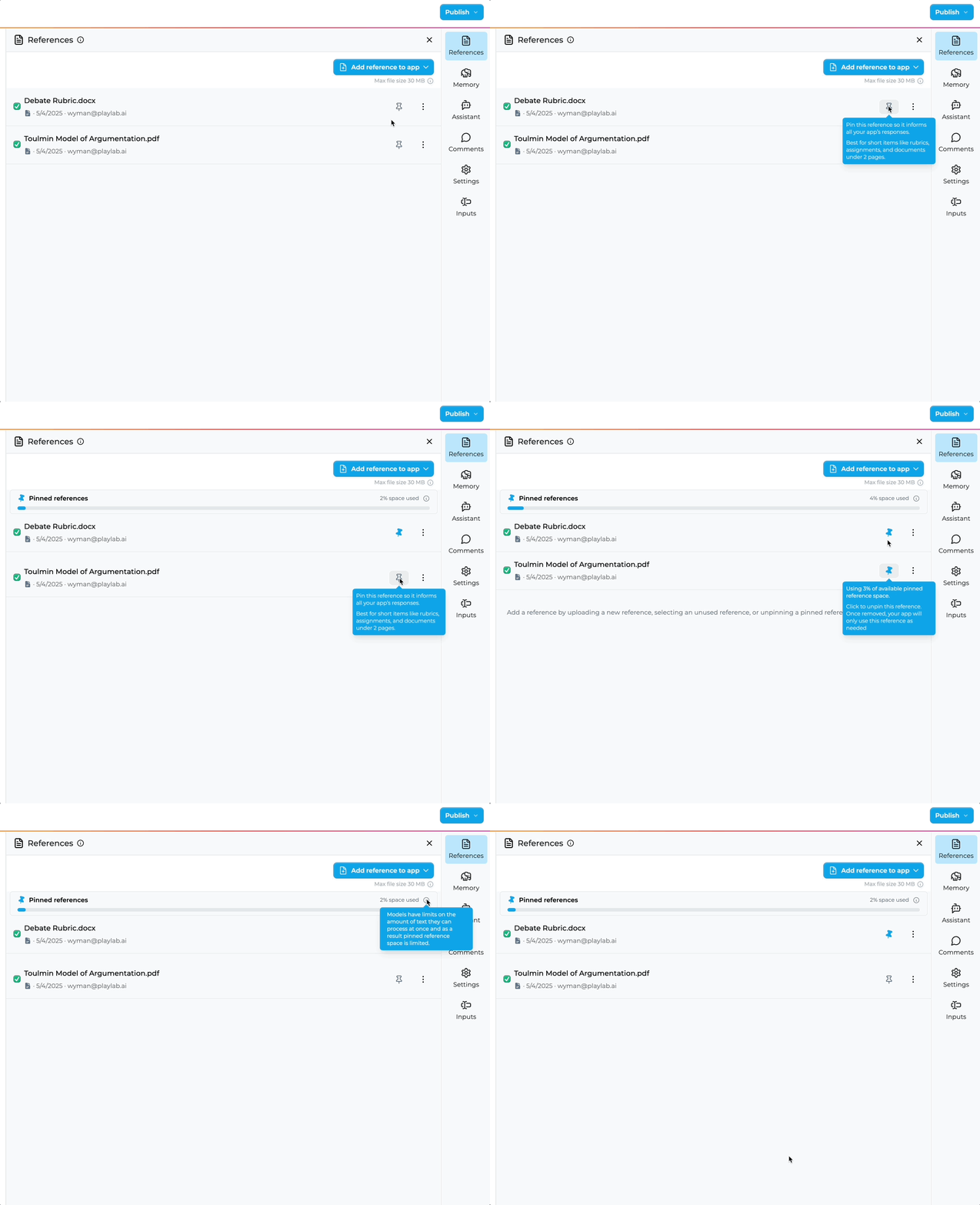
    In reference panel, pin the reference(s) you'd like to pin by clicking on the pin icon. You can also unpin any pinned references by clicking on the pin icon again.

    <img height="400" src="https://mintcdn.com/playlabai/2GudnHxecWf15e3-/images/staticreferences.gif?s=c41c9cd81a1ce40e738c653a1ad16cfb" className="border border-gray-300 rounded-md shadow-sm" data-path="images/staticreferences.gif" />
  </Step>

  <Step title="Monitor the size limit">
    Check the progress bar to ensure you haven't exceeded the pinned references size limit.

    <img height="200" src="https://mintcdn.com/playlabai/2GudnHxecWf15e3-/images/pinnedstatus.png?fit=max&auto=format&n=2GudnHxecWf15e3-&q=85&s=bb46f91bc794c7c321127c1f6788961d" width="300" className="border border-gray-300 rounded-md shadow-sm" data-path="images/pinnedstatus.png" />
  </Step>
</Steps>

## Pinned vs. Unpinned References

<CardGroup cols={2}>
  <Card title="Pinned References" icon="pin">
    <p><strong>Definition:</strong> Files pinned to be fully loaded at conversation start</p>
    <p><strong>Usage:</strong> Toggle the pin icon to mark a file as pinned</p>
    <p><strong>Best for:</strong> Critical reference documents needed in their entirety from turn one</p>
    <p><strong>Advantage:</strong> Uses the entire content of the pinned references in every single interaction</p>
    <p><strong>Limitations:</strong> Subject to a size cap (shown by progress bar) to maintain performance</p>
  </Card>

  <Card title="Unpinned References" icon="search">
    <p><strong>Definition:</strong> Files that are retrieved on-demand during conversation</p>
    <p><strong>Usage:</strong> Default for all files without the pin icon</p>
    <p><strong>Best for:</strong> Larger knowledge bases where only portions are needed at any time</p>
    <p><strong>Advantages:</strong> No size limits, more efficient use of context window</p>
    <p><strong>Limitations:</strong> Uses the most relevant excerpts from your references, based on the context of the conversation. Can be harder to predict how reliably the right information will be retrieved.</p>
  </Card>
</CardGroup>

## When should I use Pinned References?

<CardGroup cols={2}>
  <Card title="Ideal Use Cases" icon="check" color="#d1fae5">
    <p><strong>Rubric-based evaluations:</strong> When your app needs to apply specific criteria from start to finish</p>
    <p><strong>Policy enforcement:</strong> When consistent application of rules is required</p>
    <p><strong>Safety screening:</strong> When complete guidelines must be considered for every interaction</p>
    <p><strong>Small reference documents:</strong> Files that are concise and focused on a specific purpose</p>
  </Card>

  <Card title="Less Ideal Use Cases" icon="x" color="#fee2e2">
    <p><strong>Large knowledge bases:</strong> Extensive documentation better suited for RAG</p>
    <p><strong>Frequently changing references:</strong> Documents that require regular updates</p>
    <p><strong>General Q\&A applications:</strong> Where selective retrieval is more efficient</p>
  </Card>
</CardGroup>

## Best Practices

* Keep references concise and focused
* Trim unnecessary information to focus on what matters
* Split large references into logical sections if possible
* Consider what information is truly essential for first-turn understanding
* Format for clarity
* Use clear headings and structure
* Highlight critical information
* Consider using numbered lists for criteria or steps
* Test thoroughly
* Verify the app behaves as expected with the pinned reference
* Compare performance with and without pinned references
* Check how the app handles edge cases
* Balance comprehensiveness with efficiency
* More content means more accurate following of guidelines
* But too much content can slow down model responses
* Find the sweet spot for your specific use case

## FAQ

<Accordion title="Is there a size limit for Pinned References?">
  Yes, there is a cap on the total size of Pinned References as shown by the progress bar in the References panel. AI models can only accept a certain amount of text, and we've set aside a limited portion to use for static references that is roughly equivalent to \~40 pages of content. This limit exists to maintain optimal app performance by ensuring your context window isn't overwhelmed at conversation start.
</Accordion>

<Accordion title="Can I have multiple Pinned References in one app?">
  Yes, you can pin multiple files as Pinned References. However, they all count toward your Pinned References size cap, so prioritize which documents truly need to be fully available from turn one.
</Accordion>

<Accordion title="How is this different from regular references?">
  Unpinned references pull relevant sections of documents as needed during a conversation. Based on your current exchange, we find the 10 most relevant sections from all your regular references to provide to the model.

  Pinned References load the entire reference upfront, ensuring complete context from the first interaction.
</Accordion>

<Accordion title="Can I use both pinned and unpinned references?">
  Absolutely. Your results would be influenced by both the content from your pinned references, as well as the information retrieved based on your other references.
</Accordion>

<Accordion title="Can I unpin a Pinned Reference?">
  Yes, you can unpin any Pinned Reference by clicking the pin icon again. The file will remain in your References but will switch to being an unpinned reference that's retrieved on demand. Experiment and see what works best for your app!
</Accordion>

<Accordion title="Who can add Pinned References to an app?">
  Anyone with edit access to the app can add, modify, or remove Pinned References.
</Accordion>

## We Want Your Feedback!

Have you tried building with Pinned References? We'd love to hear about your experience!

Contact us at [support@playlab.ai](mailto:support@playlab.ai)

Last updated: 05-04-2025
