> ## Documentation Index
> Fetch the complete documentation index at: https://learn.playlab.ai/llms.txt
> Use this file to discover all available pages before exploring further.
# Organization Reference Library
> Create and share a central reference library across your entire Playlab organization
## What is this feature?
The Organization Reference Library lets you create and manage a central collection of references shared across all members and workspaces in your organization. Upload a knowledge file, curriculum, framework, or other material once, and any app in the organization can use it — no need to re-upload the same reference for each app.
**Coming from the previous version?** Previously, shared reference libraries were scoped to a single **workspace**. Now, the shared library is **organization-level**. When your org migrates, your existing workspace reference libraries become your organization's reference library, available to apps across all of your workspaces.
On the new Playlab, projects no longer show a workspace-level reference library — references surface at the **organization level** instead. Per-workspace reference libraries are being explored for a future release — it's more involved now because a single app can live in multiple workspaces — but for upcoming migrations, workspace references roll up to the organization.
## Rationale for the feature
Organizations often have essential knowledge bases, curricular files, and frameworks that need to be accessible across multiple teams and projects. The Organization Reference Library eliminates individual re-uploads and ensures every member has the most current, authoritative version of critical materials — a single source of truth across the whole organization.
## Watch How to Use the Organization Reference Library
How to leverage the Organization Reference Library
## How to use the Organization Reference Library
Log into your Playlab account and open any app in the builder.
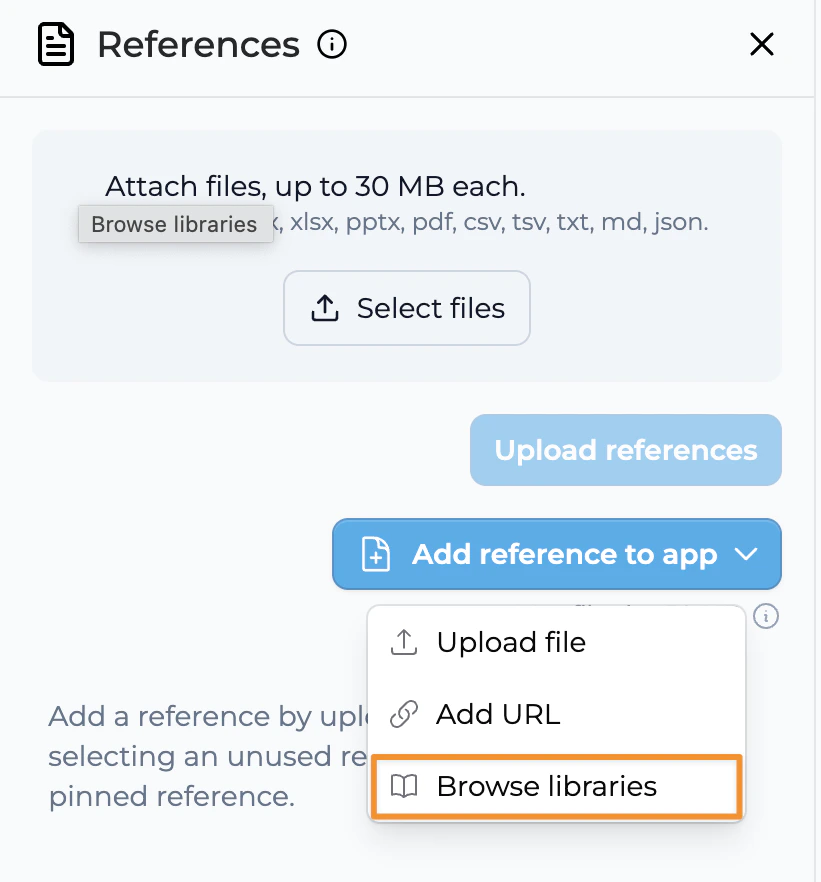 Click "Upload organization references" to add references to your organization's central reference library.
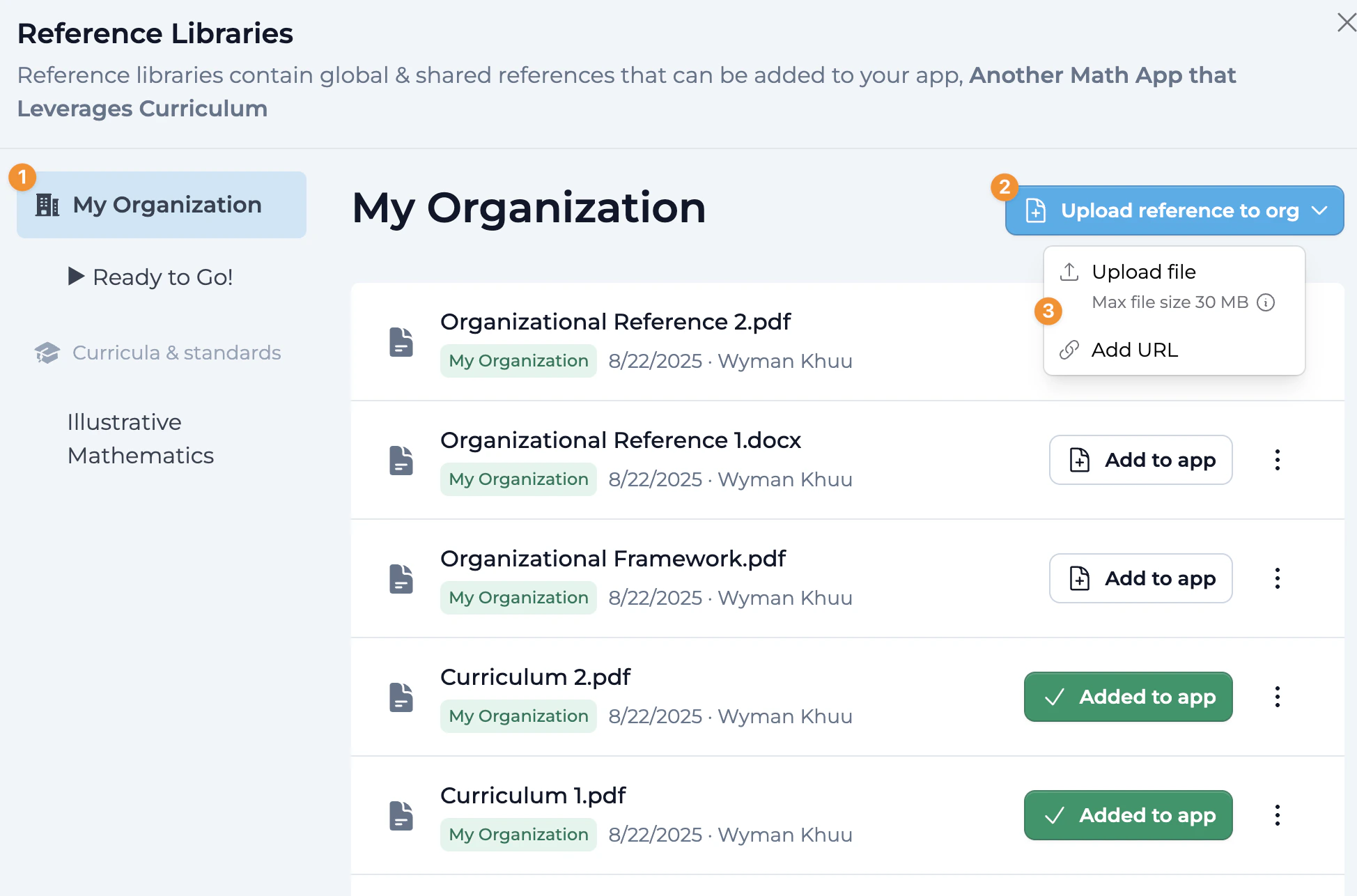 Click "Add to App" to attach relevant organization references to your specific Playlab app.
* Once added, a green check mark confirms the reference is attached to your app.
* You can remove a reference from an app at any time, giving you full control over which references are active.
The organization references are now available in your app and accessible to everyone in the organization working on it.
## Best Practices
Add references that are useful across many apps in your organization — shared curricula, frameworks, and knowledge bases.
Keep the most up-to-date version in the library so every app stays consistent.
Use descriptive filenames that clearly indicate the content and purpose of each reference.
Be selective about which references you attach to any single app; attach only what that app needs to stay focused and performant.
Establish a clear process for who can add, modify, or remove organization references.
Review references regularly to ensure they contain current information.
## FAQ
No — projects on the new Playlab no longer show a workspace-level reference library. The shared reference library is organization-level. When your org migrates, your workspace reference libraries become your organization's reference library, available across all workspaces. Per-workspace reference libraries are being explored for a future release but aren't available today — so for upcoming migrations, workspace references roll up to the organization.
Anyone who can build in your Playlab organization can access and use the references in the library, ensuring consistent access to important materials across teams and projects.
Yes. Organization administrators can manage permissions for the reference library, ensuring only authorized people can change critical materials.
Curricular files, organizational frameworks, brand guidelines, compliance documents, training materials, and any knowledge base multiple teams or departments reference regularly all work well.
Like other references, be selective about which ones you attach to each app to maintain optimal performance, even though the library itself can hold many references.
When you update a reference in the library, the change is automatically reflected in every app across the organization that uses it, so everyone has the most current version.
You'll see a confirmation showing how many apps currently use that reference. If you confirm, the reference is removed from those apps and no longer appears in the library for anyone in the organization.
Yes. You can mix organization references (available org-wide) with references you upload directly to one app, giving you flexibility in how you structure an app's materials.
You lose access to the organization's references. Any apps you built that used those references will need alternative references added if you want to keep using them outside the organization.
There are practical size limits for individual files, but the library is designed to hold a wide range of materials. For very large files, consider breaking them into smaller, more manageable components.
## We Want Your Feedback!
Have you used the Organization Reference Library? We'd love to hear how it's helping your organization stay consistent across projects.
Contact us at [support@playlab.ai](mailto:support@playlab.ai)
***
Last updated: 06-22-2026
Click "Add to App" to attach relevant organization references to your specific Playlab app.
* Once added, a green check mark confirms the reference is attached to your app.
* You can remove a reference from an app at any time, giving you full control over which references are active.
The organization references are now available in your app and accessible to everyone in the organization working on it.
## Best Practices
Add references that are useful across many apps in your organization — shared curricula, frameworks, and knowledge bases.
Keep the most up-to-date version in the library so every app stays consistent.
Use descriptive filenames that clearly indicate the content and purpose of each reference.
Be selective about which references you attach to any single app; attach only what that app needs to stay focused and performant.
Establish a clear process for who can add, modify, or remove organization references.
Review references regularly to ensure they contain current information.
## FAQ
No — projects on the new Playlab no longer show a workspace-level reference library. The shared reference library is organization-level. When your org migrates, your workspace reference libraries become your organization's reference library, available across all workspaces. Per-workspace reference libraries are being explored for a future release but aren't available today — so for upcoming migrations, workspace references roll up to the organization.
Anyone who can build in your Playlab organization can access and use the references in the library, ensuring consistent access to important materials across teams and projects.
Yes. Organization administrators can manage permissions for the reference library, ensuring only authorized people can change critical materials.
Curricular files, organizational frameworks, brand guidelines, compliance documents, training materials, and any knowledge base multiple teams or departments reference regularly all work well.
Like other references, be selective about which ones you attach to each app to maintain optimal performance, even though the library itself can hold many references.
When you update a reference in the library, the change is automatically reflected in every app across the organization that uses it, so everyone has the most current version.
You'll see a confirmation showing how many apps currently use that reference. If you confirm, the reference is removed from those apps and no longer appears in the library for anyone in the organization.
Yes. You can mix organization references (available org-wide) with references you upload directly to one app, giving you flexibility in how you structure an app's materials.
You lose access to the organization's references. Any apps you built that used those references will need alternative references added if you want to keep using them outside the organization.
There are practical size limits for individual files, but the library is designed to hold a wide range of materials. For very large files, consider breaking them into smaller, more manageable components.
## We Want Your Feedback!
Have you used the Organization Reference Library? We'd love to hear how it's helping your organization stay consistent across projects.
Contact us at [support@playlab.ai](mailto:support@playlab.ai)
***
Last updated: 06-22-2026