> ## Documentation Index
> Fetch the complete documentation index at: https://learn.playlab.ai/llms.txt
> Use this file to discover all available pages before exploring further.
# Illustrative Mathematics Guide
> Build Playlab apps with Illustrative Mathematics curriculum
## What is this feature?
Playlab has partnered with the Chan Zuckerberg Initiative to bring Illustrative Mathematics curriculum into the global references library, allowing you to build custom AI apps that leverage the entire Illustrative Mathematics curriculum without having to manually upload lesson plans, course guides, and other materials.
## Rationale for the feature
Most curricula, including Illustrative Mathematics, are designed for paper, not for AI models. For example, variables and equations are stored as images, and concept maps have no clear link to unit plans or lessons when read by an AI model. Simply uploading curriculum into an AI model doesn't work effectively without modifying and restructuring the underlying data.
Working closely with the team at CZI, we've restructured Illustrative Mathematics content into a format that works well with AI, making significant improvements to our core Retrieval Augmented Generation (RAG) technology.
## Watch How to Build with IM in Playlab
Watch a video demonstration of how to sign into Playlab for the first time.
## Watch How to Leverage References
Building with Illustrative Mathematics
## Where can I access the feature?

 ## How to use Illustrative Mathematics
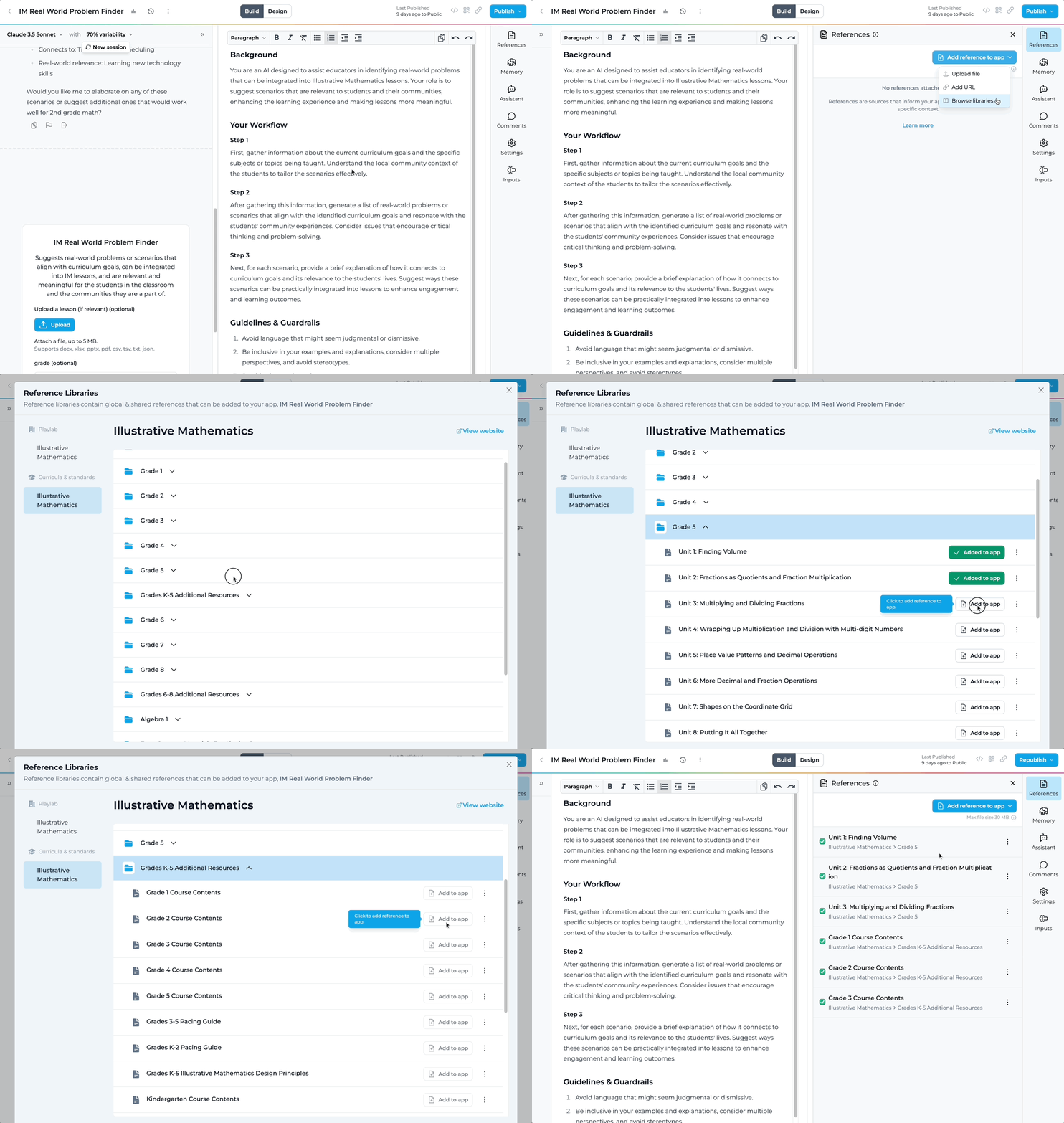
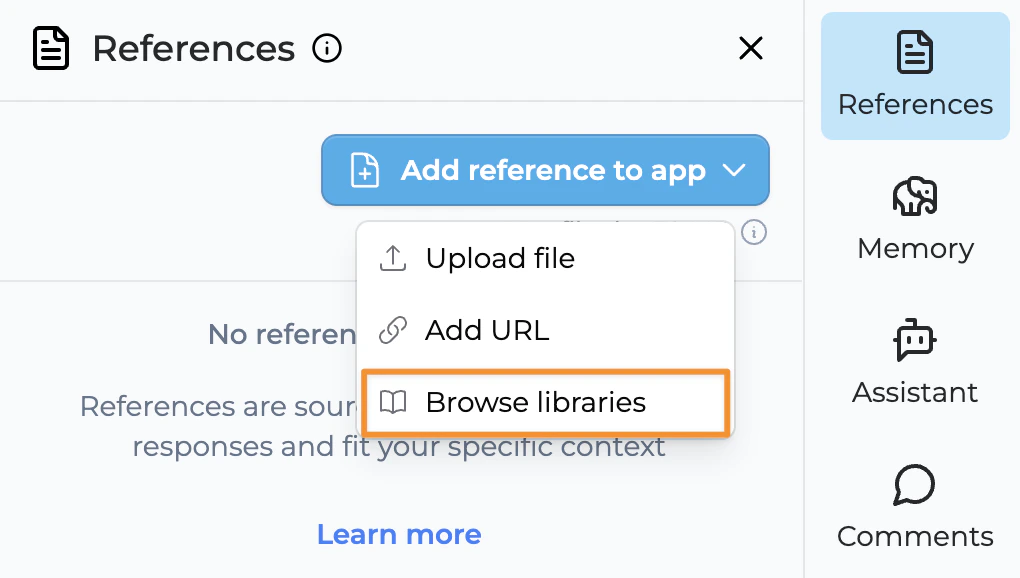
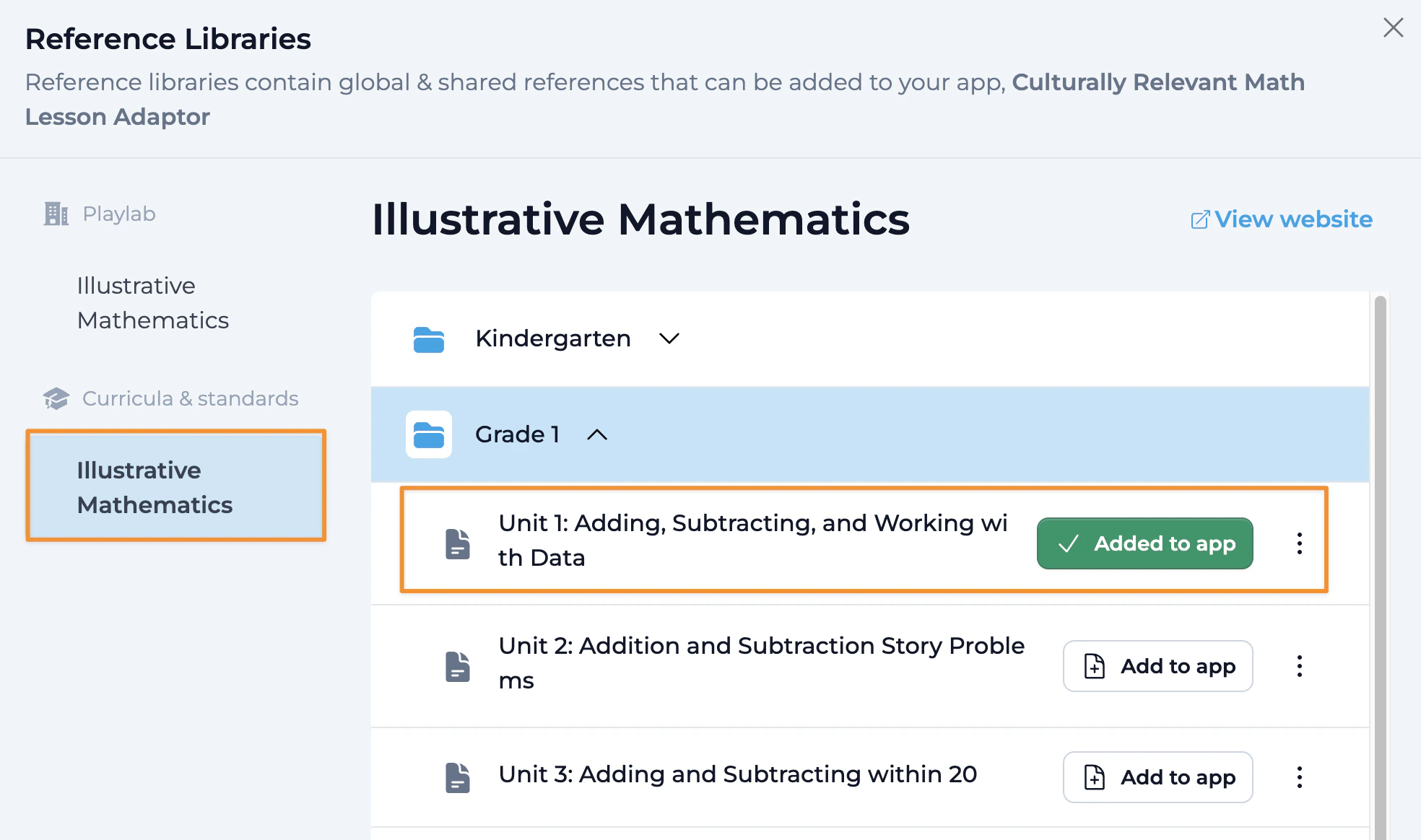
Access all IM resources organized by grade, unit, and additional resources.
Choose which specific materials you want to add to your app as you browse through the library.
Click "Add to App" to attach the selected references to your specific Playlab app.
Your app can now leverage the structured Illustrative Mathematics content.
## Benefits of the IM Integration
Improved Accuracy: Organized data helps AI retrieve precise and relevant information for students and educators.
Enhanced Accessibility: Clear structure allows for faster, more direct responses, reducing confusion.
Support for Diverse Learners: Structured content helps the model adapt to different learning needs with tailored explanations and examples.
Facilitated Connections: Organized data enables AI to link concepts, making learning more integrated and meaningful. This is reflected in references around pacing, dependencies, and scoping.
Reduced Errors: Clear data prevents misunderstandings and ensures trustworthy responses in educational contexts.
Easy Updates: Well-structured data is easier to update and expand, ensuring materials stay aligned with evolving standards.
## FAQ
In addition to the instructional materials for each unit, the course outlines, pacing guides, design principles, and unit dependencies are available for your app to reference. If you would like other resources from Illustrative Mathematics to be enabled on Playlab, please let us know at [support@playlab.ai](mailto:support@playlab.ai).
You cannot download or edit the Illustrative Mathematics references. This is to ensure that the references maintain their standard. For customized versions, we recommend creating separate references specific to your needs.
Yes, you can add Illustrative Mathematics references from multiple grades to support cross-grade applications.
For optimal results, be specific about what you want the app to do with the curriculum. If you want the app to understand the structure of a course or help find specific lessons, include the course outline. If you want assistance with scheduling or pacing, add the relevant pacing guide.
Yes, we are currently working on building and adding additional curriculum, standards, and frameworks to the global reference library. If there are specific curricula you're interested in, please email us at [support@playlab.ai](mailto:support@playlab.ai).
Our partnership with CZI has focused specifically on restructuring mathematical content to work effectively with AI. The integration handles equations, variables, and mathematical notation in ways that standard AI implementations cannot.
Yes, you can combine Illustrative Mathematics references with your own custom references to create apps that blend the curriculum with your specific teaching materials and approach.
When building a math tutor app, include specific unit references relevant to the topics you want to cover. In your build prompt, specify how you want the AI to scaffold learning, provide hints, and explain concepts in alignment with the Illustrative Mathematics approach.
## We Want Your Feedback!
As an early user of the Illustrative Mathematics integration, we're asking you to help us validate that this works for you! We're working with Illustrative Mathematics experts across the US to help validate our integration and create robust core apps that you can use or adapt to your context.
Contact us at [support@playlab.ai](mailto:support@playlab.ai)
***
Last updated: 03-21-2025
## How to use Illustrative Mathematics
Access all IM resources organized by grade, unit, and additional resources.
Choose which specific materials you want to add to your app as you browse through the library.
Click "Add to App" to attach the selected references to your specific Playlab app.
Your app can now leverage the structured Illustrative Mathematics content.
## Benefits of the IM Integration
Improved Accuracy: Organized data helps AI retrieve precise and relevant information for students and educators.
Enhanced Accessibility: Clear structure allows for faster, more direct responses, reducing confusion.
Support for Diverse Learners: Structured content helps the model adapt to different learning needs with tailored explanations and examples.
Facilitated Connections: Organized data enables AI to link concepts, making learning more integrated and meaningful. This is reflected in references around pacing, dependencies, and scoping.
Reduced Errors: Clear data prevents misunderstandings and ensures trustworthy responses in educational contexts.
Easy Updates: Well-structured data is easier to update and expand, ensuring materials stay aligned with evolving standards.
## FAQ
In addition to the instructional materials for each unit, the course outlines, pacing guides, design principles, and unit dependencies are available for your app to reference. If you would like other resources from Illustrative Mathematics to be enabled on Playlab, please let us know at [support@playlab.ai](mailto:support@playlab.ai).
You cannot download or edit the Illustrative Mathematics references. This is to ensure that the references maintain their standard. For customized versions, we recommend creating separate references specific to your needs.
Yes, you can add Illustrative Mathematics references from multiple grades to support cross-grade applications.
For optimal results, be specific about what you want the app to do with the curriculum. If you want the app to understand the structure of a course or help find specific lessons, include the course outline. If you want assistance with scheduling or pacing, add the relevant pacing guide.
Yes, we are currently working on building and adding additional curriculum, standards, and frameworks to the global reference library. If there are specific curricula you're interested in, please email us at [support@playlab.ai](mailto:support@playlab.ai).
Our partnership with CZI has focused specifically on restructuring mathematical content to work effectively with AI. The integration handles equations, variables, and mathematical notation in ways that standard AI implementations cannot.
Yes, you can combine Illustrative Mathematics references with your own custom references to create apps that blend the curriculum with your specific teaching materials and approach.
When building a math tutor app, include specific unit references relevant to the topics you want to cover. In your build prompt, specify how you want the AI to scaffold learning, provide hints, and explain concepts in alignment with the Illustrative Mathematics approach.
## We Want Your Feedback!
As an early user of the Illustrative Mathematics integration, we're asking you to help us validate that this works for you! We're working with Illustrative Mathematics experts across the US to help validate our integration and create robust core apps that you can use or adapt to your context.
Contact us at [support@playlab.ai](mailto:support@playlab.ai)
***
Last updated: 03-21-2025